
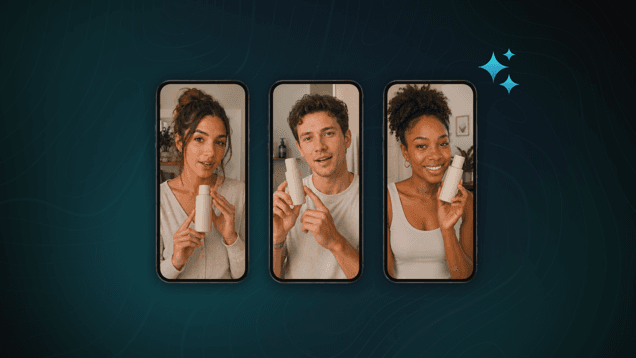
What Are AI UGC Ads?
AI UGC ads are video ads generated to look like the organic, creator-style content already filling feeds on TikTok, Reels, and YouTube Shorts. An advertiser uploads a product photo and a short prompt, and the platform generates a video of an AI avatar delivering the pitch, styled after popular formats like try-on, review, or unboxing videos. The result is a fully AI-generated video that looks and feels native among the other UGC videos someone likely sees every day.
Because the entire process happens through prompts and templates rather than physical production, brands can turn around new ad variations in minutes instead of days. That efficiency also makes it easy to scale, testing dozens of hooks, angles, or product variations at once instead of committing budget to just one or two concepts.
Benefits of UGC Ads
Speed to Launch
Traditional UGC requires sourcing a creator, negotiating terms, scheduling a shoot, and waiting on edits, a process that can take days or weeks before an ad is ready to run. AI UGC compresses that timeline to hours. An advertiser can go from a product photo and a prompt to a finished video fast enough to capitalize on time-sensitive moments: a flash sale, a trending audio format, a competitor's stumble, a news cycle. In a feed environment where relevance often has a short shelf life, that turnaround speed is a genuine structural advantage.
Testing and Iteration at Scale
Commissioning multiple creator-shot videos to test different hooks, angles, or pacing is expensive and slow enough that most brands settle for one or two concepts per campaign. AI UGC removes that constraint. A brand can generate dozens of variants at once, swap out a product claim, delivery style, or setting, and let performance data determine the winner instead of guessing upfront. This kind of granular, high-volume testing is largely impractical with traditional UGC and represents one of the clearest advantages unique to the AI-generated format.
Consistency and Control Over Messaging
Real creators improvise. They forget talking points, phrase claims loosely, or go off-script in ways that can create compliance headaches, especially in regulated categories like supplements, financial products, or skincare where specific language matters. AI-generated scripts deliver the same claims the same way every time, giving brands tighter control over exactly what's said and how, without relying on a live take or a retake request.
Establish Usage and Compliance Guidelines
An AI-generated avatar isn't a real customer, and regulators increasingly expect that fact to be told to the viewer. For instance, New York has introduced its own disclosure requirements for AI-generated performers in advertising, and platforms including Meta run their own labeling rules for AI-generated or AI-modified content, layered on top of federal requirements.
A disclosure line, something as simple as noting the video was AI-generated, can handle most of this, but rules can vary by platform and jurisdiction, so we recommend double checking the requirements in your area or on the channel you plan to run. Especially for regulated categories, such as health and finance, you may want to loop in legal to ensure compliance before AI-generated ads go live.
Step 1: Define Your UGC Ad Goal and Audience
Decide what the ad needs to do before getting started. An awareness ad for general audiences and a retargeting spot aimed at cart abandoners both call for different hooks and pacing. Audience matters as much as funnel stage; a review that lands with a skincare crowd on TikTok won't necessarily land with a hardware crowd on Instagram.
Step 2: Select a UGC Effect
Pick the effect that matches the kind of ad you want to generate. Choosing an Unboxing effect is a good fit if you want the ad to center on a reveal moment, while a Product Review effect acts more like a classic testimonial video.
Step 3: Upload a Photo of Your Product
The effect needs a reference image to build off of, and a single clear, well-lit photo does the job. After you upload the image, the chosen effect handles the rest, taking cues from the visual to generate everything from the avatar to the setting. That one photo becomes the backbone for the entire ad the AI creates.
Step 4: Add a Short UGC Prompt
Two or three sentences on what you want called out about the product is all you need. These effects take a short brief and run with it, handling pacing and delivery on their own once they have direction. You can save full scripts for longer, more detailed projects.
Step 5: Generate Your AI UGC Ad
Hit generate, and the whole video comes together at once. What used to require multiple days of production now takes about the length of a coffee break. Seriously.
Step 6: Review Your Draft and Regenerate If Needed
You'll want to review the whole video to make sure it's actually hitting everything you asked for. Check that the message came through clearly, that the product matches your reference photo, and that the pacing fits wherever the ad is headed. You should also consider adding captions to your creative, since most social video plays on mute. If something's off, tweak the prompt and hit generate again for a fresh version.
Step 7: Export and Publish
Once you’ve fine-tuned your video, it’s ready to go live. When exporting, keep each platform's technical specifications in mind before publishing. That said, many AI UGC tools already bake these specifications into their generations, so you don't have to worry about resizing footage or trimming it down to length. These platforms often also have features that will allow you to publish directly to your social channels without having to leave the tool.
How QuickFrame AI Can Help
These steps are exactly what you'll take inside QuickFrame AI. The platform keeps a full gallery of UGC effects covering the most common formats, from unboxings and reviews to try-ons, and each one is ready to generate as soon as you upload a photo and write a prompt. You'll find the gallery under the Video Effect entry point on QuickFrame AI's Explore page. Here’s a short list to give you an idea of what’s available:
UGC Effects
1. UGC Try-On
Creator-style footage of someone wearing your product, built to sit naturally in a TikTok, Reels, or Shorts feed.
An influencer-style review made to feel native to social feeds.
3. UGC Unboxing
A reveal-driven unboxing that presents your product in cinematic detail.
A step-by-step, clean tutorial-style walkthrough of your product in action.
A scroll-stopping product vlog built around a trending hook.
AI UGC Ads: Final Thoughts
AI UGC ads remove the traditional bottlenecks of producing creator-style content, turning a product photo and a short prompt into a finished, native-feeling video in hours instead of days. That speed also makes it possible to test dozens of variants at once while keeping messaging consistent, giving brands a faster, more scalable way to produce the content people are already watching.
Try QuickFrame AI today to start bringing your next ad to life.